PyInstaller and py2exe bundle a Python application and all its dependencies into an executable file. The user can run the EXE file without installing a Python interpreter or any modules.
As we all know, Python is an easy and effortless scripting language, so malware authors prefer Python for writing malware and convert it into an exe file using py2exe or PyInstaller.
In this blog, I am going to explain how to reverse those binaries and extract the Python source code.
Case I :
Let’s take this file d243ca34ec6a2f7995730747c6d73388 [VirusTotal
][HybridAnalysis
]
This file is compiled and built by py2exe
.
How can you tell it is generated by py2exe?
OK, let’s have a look at the resources of the binary.

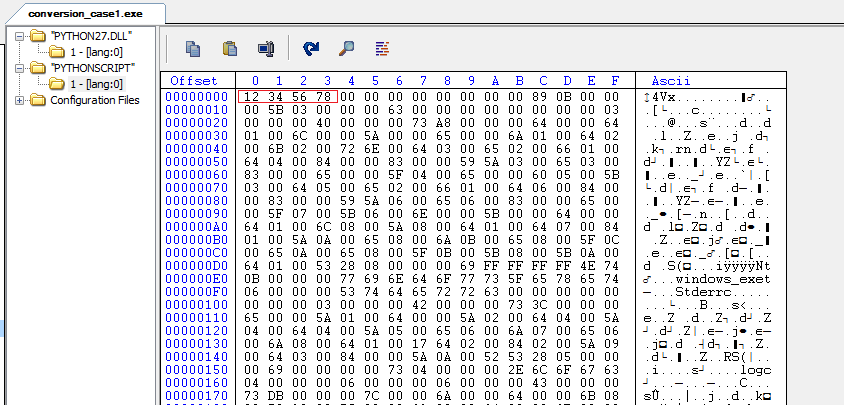
Fig 1 : Case-1 resources
You will find two resources in this binary. The first one is “PYTHON27.DLL” which has the embedded python.exe of version 2.7, and the other one is “PYTHONSCRIPT” which is nothing but the compiled version of the Python script.
PYTHONSCRIPT starts with the header of size 0x10 and first 8 bytes are magic number 12345678.
How do I get the source code?
Ok, first you have to dump the PYTHONSCRIPT resource.
The first 0x10 bytes are the header and the remaining bytes are marshalled or serialized data, so we have to unmarshal it.
To unmarshal, you can use the below Python code:
import marshal, imp

f=open('PYTHONSCRIPT','rb')
f.seek(17)  # Skip the header of size 0x10

ob=marshal.load(f)

for i in range(0,len(ob)):
    open(str(i)+'.pyc','wb').write(imp.get_magic() + '\0'*4 + marshal.dumps(ob[i]))

f.close()
This script will read the PYTHONSCRIPT dump file, skip the 0x10 bytes of header, unmarshal the remaining data, and save the Python compiled scripts (.pyc).
In this case, you will get the 3 below Python compiled scripts.
0.pyc
1.pyc
2.pyc
You got the pyc files, now you just need a Python decompiler to get the source code.
You can download the uncompyle6 decompiler from here
and install it by running its setup.py file.
Or just install it using pip from the terminal or cmd.
pip install uncompyle6
After installation, just run it with the .pyc file and you will get the source code of the final Python file.
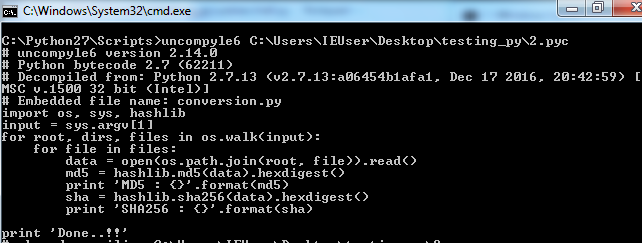
Fig 2 : decompile python script
Case II :
Now, look at this file 38d795517e7aab20e3fb80e52a30aa5f [VirusTotal
][HybridAnalysis
]
If you check the resources of this binary, you will not find a “PYTHON27.DLL” or “PYTHONSCRIPT” resource.
So, you can say this binary is not built by py2exe.
Now look at the overlay of this binary.
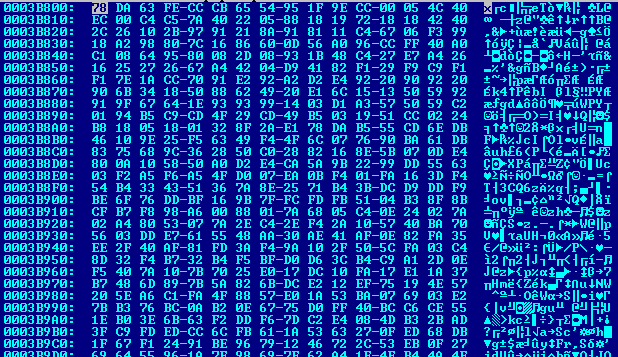
Fig 3 : Overlay of case II binary
The overlay starts with the magic number 78DA63FE and the remaining data is Python modules encoded with Zlib.
From this magic number, you can say it is built by PyInstaller and contains a Python script.
To extract the Python modules from the executable, we have an extractor tool, pyinstxtractor .
Just run this with the executable binary file.
pyinstxtractor.py conversion_case2.exe
After extraction, you will get the files as shown in Fig4.
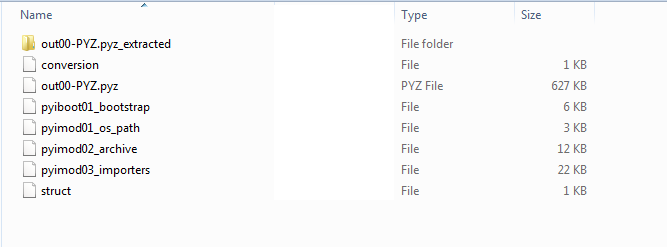
Fig 4 : Extracted modules of Case II
“out00-PYZ.pyz_extracted” contains the Python compiled scripts (pyc) of the imported Python modules.
We just need the main file, so here “conversion” is our main file.
It is a .pyc file without a magic header.
Magic number of a .pyc file is 03F30D0A00000000 of length 8 bytes, you just need to prepend this magic number to the “conversion” file and rename it to “conversion.pyc”
Now, you have the .pyc file, you can use the uncompyle6 decompiler as explained in Case I to decompile the .pyc
After decompilation, you will get the final Python code (.py).
Case III:
Let’s have a look at fe23fb462a9e6f730ee6e93daef27c5c [VirusTotal ][HybridAnalysis ]
This binary does not have resources like Case I; now let’s see the overlay data.
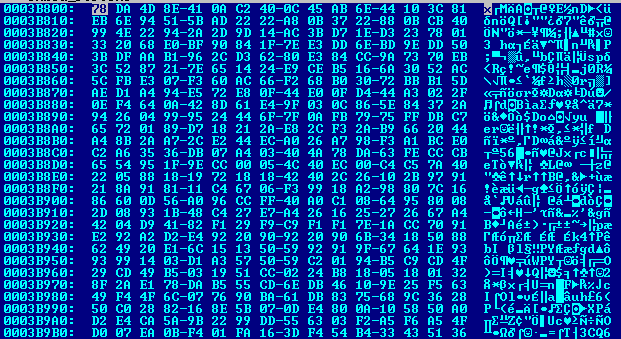
Fig 5 : Overlay of Case III binary
Here we have the 78DA4D8E magic number; the first two bytes are similar to Case II.
Yes, it is similar to Case II but the difference is only with the extracted modules.
Just extract this binary with pyinstxtractor as we did in Case II.
After extraction, you will get the files as shown in Fig 6.
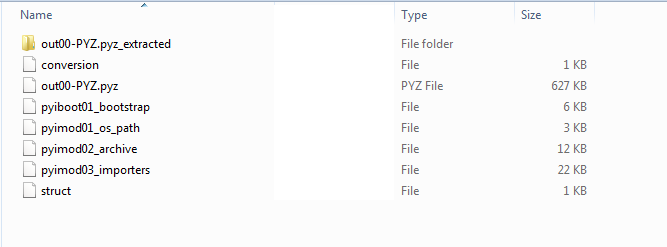
Fig 6 : Extracted modules of Case III binary
In Case II, the “out00-PYZ.pyz_extracted” directory contains the .pyc files of imported Python modules, but in this case you will get the files as shown in Fig 7.
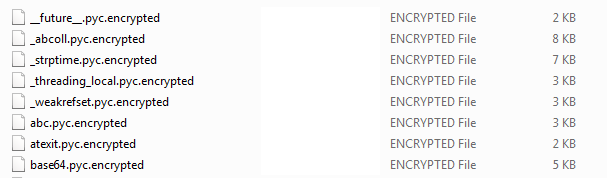
Fig 7 : Imported modules in Case III
These modules are encrypted by AES with CFB mode.
If you open “pyimod00_crypto_key” shown in Fig 6, you will get the AES encryption key which starts at 0x32 and ends with “N(”.
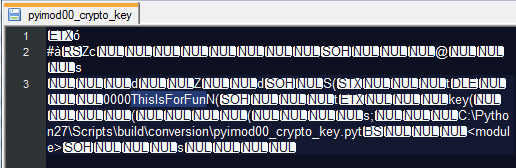
Fig 8 : AES encryption key
In this case, “0000ThisIsForFun” is the AES encryption key and First 8 bytes of pyinmod00_crypto_key file is the Initial Vector (IV) of AES encryption.
So, If you need the python modules you can use below script to get it back.
from Crypto.Cipher import AES
import zlib

CRYPT_BLOCK_SIZE = 16

# key obtained from pyimod00_crypto_key
key = '0000ThisIsForFun'

inf = open('_abcoll.pyc.encrypted', 'rb') # encrypted file input
outf = open('_abcoll.pyc', 'wb') # output file

# Initialization vector
iv = inf.read(CRYPT_BLOCK_SIZE)

cipher = AES.new(key, AES.MODE_CFB, iv)

# Decrypt and decompress
plaintext = zlib.decompress(cipher.decrypt(inf.read()))

# Write pyc header
outf.write('\x03\xf3\x0d\x0a\0\0\0\0')

# Write decrypted data
outf.write(plaintext)

inf.close()
outf.close()
To get main python program, prepend the .pyc magic number 03F30D0A00000000 to “conversion” file shown in Fig6 and rename it to “conversion.pyc” and use uncompyle6 decompiler to decompile this file and get the source code.
Case IV:
In some cases, pyc file failed to decompile by decompiler because it has its bytecode manipulated to prevent it from being decompile it easily.
So, in this case we have to disassemble the .pyc file using python disassembler, deobfuscate it and then decompile.
I prefer to disassemble this kind of binaries and try to understand bytecode only.
bytecode is easy to understand, you will get this by using following python code.
import dis
dis.dis("compiled_python.pyc")
You can learn more about python byte code instructions at here .
That’s it.
Thank you 😊